As I made a blog about myself, I stated that I love editing in adobe and
this was my first attempt to do putting make up in adobe. This phase of adobe is the most trickiest of all. You need a lot of patience and trial and error. Specially changing the color of the hair and the color of the eyes.
This is my little tutorial.
First, choose a picture that is easily to edit

Zoom in your chosen pic by zoom tool

Use the
dodge tool to highlight your under eye, it will serve as your concealer, you can use
blur tool to get rid freckles and pimples.
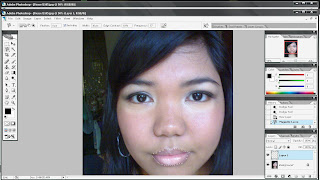
To put a lipstick, click
"new layer" in the
layer window that you will found in the lower part of your window for the layer you will use. Use the
magnetic lasso tool to trace your lips.

Right click within the area of the traced lips to fill your desire color.

To lighten the color right-click the layer number in the
layer window, click blending option.
You will see the
opacity meter, choose your desire percent of opacity.

tadah!
You will see the changes in the lips, I'm sorry that I didn't print screen the tutorials for blush on and eye shadows.
This is a trial only, if I will do a photoshop tutorial or not. Feedbacks will do help me to decide.
 From this
 To this
 It's an all girls group in Japan, Morning Musume!


